 Eileen Yu
Setting Up OpenClaw as My Personal Slack Coding Assistant
I wanted to be able to DM a bot on Slack and ask things like “what changed in the repo this week?” or “where is the rate limiter configured?” — and get an answer that actually understands my codebase. Here’s how I set that up with OpenClaw.
The Goal
A personal AI coding assistant that:
- Lives in Slack — accessible from laptop or phone
- Reads my local codebase on the fly, no pre-indexing
- Runs entirely on my machine — data only leaves for LLM API calls
- Configuration-only — no custom code needed
What is OpenClaw?
OpenClaw is an open-source AI agent platform that connects to messaging platforms (Slack, Discord, Telegram, etc.). It routes your messages to an LLM and gives the LLM access to tools — file I/O, shell commands, web search. Essentially a local AI agent with a chat interface.
Architecture
Slack (DM / @mention)
    │
    │  Socket Mode (WebSocket)
    │
    ▼
OpenClaw Gateway (localhost:18789)
    │
    ├── Agent (Claude Sonnet 4.6)
    │     ├── exec (git, grep, find...)
    │     ├── read / write / edit files
    │     ├── web search
    │     └── memory (SQLite)
    │
    └── Workspace: ~/programming/eiclaw
          ├── SOUL.md (personality & rules)
          ├── AGENTS.md (runtime behavior)
          ├── USER.md (user profile)
          └── projects/ (repo references)
The gateway runs as a macOS launchd daemon. It starts on boot, auto-restarts on crash, and connects to Slack via WebSocket. No server, no cloud infrastructure.
Setup
1. Install OpenClaw
Standard install. The onboarding wizard handles LLM provider setup and creates the config at ~/.openclaw/openclaw.json.
2. Create the Slack App
In the Slack API dashboard:
- Create a new app with Socket Mode enabled — this is the key part. Socket Mode means your bot connects out to Slack over WebSocket, so no public URL, no ngrok, no tunnel needed.
- Add bot token scopes:
chat:write,app_mentions:read,im:history,im:read,im:write,users:read - Install to your workspace and grab the Bot Token (
xoxb-...) and App Token (xapp-...)
Then configure OpenClaw’s Slack channel:
{
  "channels": {
    "slack": {
      "type": "slack",
      "mode": "socket",
      "botToken": "xoxb-...",
      "appToken": "xapp-...",
      "dmPolicy": "allowlist",
      "allowFrom": ["id:YOUR_SLACK_USER_ID"]
    }
  }
}
The allowlist policy restricts access to your Slack user ID only — important since the bot runs on your machine with file system access.
3. Configure the LLM
I used Claude Sonnet 4.6 as the default — reasonable balance of speed and capability for daily coding tasks. Opus is available for in-session switching when needed, no restart required.
{
  "llm": {
    "default": "anthropic/claude-sonnet-4-6",
    "fallback": ["anthropic/claude-haiku-4-5"]
  }
}
The fallback chain means if Sonnet hits rate limits, it degrades to Haiku automatically.
4. Set Up the Workspace
OpenClaw uses a workspace directory with markdown files that shape the agent’s behavior:
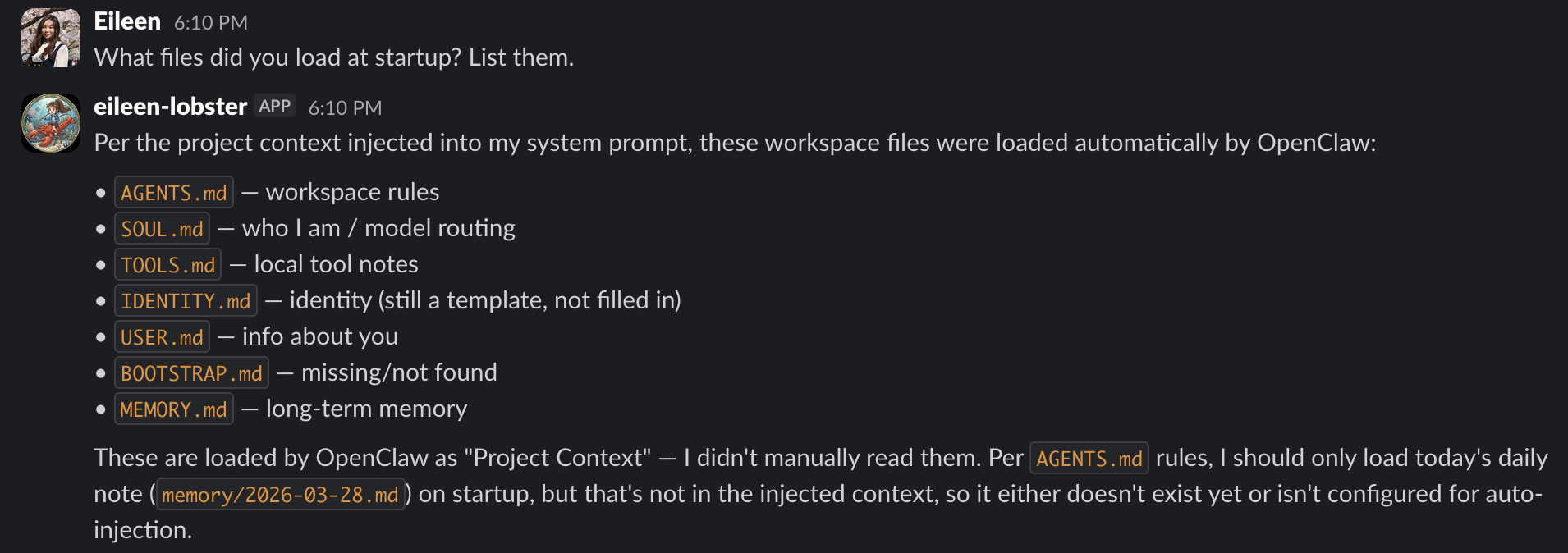
- SOUL.md — Behavioral rules: “be concise”, “don’t modify files without asking”, “route complex tasks to Opus”
- USER.md — My profile: timezone, machine specs, current projects. Saves repeating context every conversation.
- projects/cloudgrid/REFERENCE.md — Architecture overview of my work repo. Key directories, conventions, stack. The agent reads this when I ask about the codebase.
The agent doesn’t pre-index code. It uses tools at query time — exec to run git/grep/find, read to view files. Always working with the latest state, but it does mean the LLM needs to be competent at navigating codebases through tools.
5. Daemon (Handled Automatically)
OpenClaw sets up a macOS launchd daemon during installation — no manual configuration needed. It registers a plist at ~/Library/LaunchAgents/ai.openclaw.gateway.plist that starts the gateway on boot and auto-restarts on crash. Logs go to ~/.openclaw/logs/.
The gateway binds to localhost:18789 by default. You can verify it’s running with:
launchctl list | grep openclawThings I Ran Into
Slack OAuth scopes — I forgot the users:read scope initially. Without it, the bot can’t resolve user IDs, which breaks the allowlist access control. It silently fails to verify who’s messaging it.
Memory is not code indexing — OpenClaw’s memory plugin stores the agent’s own notes and conversation context. It does not index source code. Codebase understanding is entirely tool-driven at query time. This keeps things fresh but means the LLM quality matters a lot for code navigation.
Socket Mode vs. Webhooks — Most Slack bot tutorials default to webhook mode, which requires a public URL. Socket Mode connects outbound over WebSocket — no inbound ports, no ngrok. Better fit for a local-only setup.
Personality files work well in practice — The SOUL.md / AGENTS.md pattern is more effective than I expected. Writing explicit behavioral rules (“confirm before editing”, “Sonnet for quick tasks, Opus for analysis”) leads to fairly consistent behavior across sessions.
It Works
Here’s what it looks like in practice — asking the bot what files it loaded at startup:
Daily Use
What I typically ask:
- “What does the auth middleware do in cloudgrid?”
- “What changed in the last 5 commits?”
- “Where is the rate limiter configured?”
- General rubber ducking — explaining a problem to it and getting a response helps organize my thinking
It’s not a replacement for an IDE setup. It’s more like having a knowledgeable teammate on Slack who has read your codebase.
Future Plans
- MCP integration — Connect to GitHub for PR, issue, and CI access
- Multi-repo support — Currently pointed at one workspace
- Voice mode — OpenClaw supports this on macOS; haven’t tried it yet
Setup Summary
- Install OpenClaw
- Create a Slack app with Socket Mode
- Configure workspace with personality/reference files
- Set up launchd daemon
- Start chatting
The whole setup took an afternoon. The result is a local AI assistant that can read your code, accessible from Slack.